Google Tag Manager: how it works and what you need to do with it in 2026
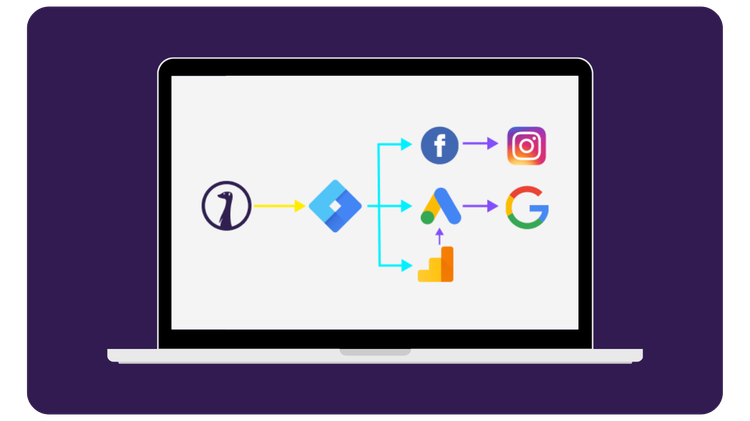
The days when you promoted your event with flyers and always carried a roll of tape and posters in your pocket are slowly coming to an end. Whereas you used to have to hire your web developer for every marketing tool you wanted to use to install yet another new tracking script on your site, with Google Tag Manager (GTM) you only need to do that once. Your developer places one script, and after that, you as a marketer manage yourself which data goes to which platform.
Containers, Tags, and Triggers
In GTM, you work with a container: a collection of rules that determine what happens when a visitor does something on your site or in your ticket shop. A script that you add is called a Tag. The action that triggers that script (a page loading, a button being clicked) is called a Trigger.
For example, someone buys a ticket. Your Trigger recognizes that purchase, and your Tag sends the amount and the visitor's source to Google Analytics. This way, you can later see exactly how much revenue came in via your newsletter. Most marketing tools offer ready-made tags that you add to your container with a few clicks, so you don't have to do any programming yourself.

Setting up your consent layer
Since March 2024, Google Consent Mode v2 is mandatory for anyone using Google Ads or GA4 and tracking visitors in the European Economic Area (EEA) or the United Kingdom (UK). Without correct implementation, Google simply does not collect data from EU visitors who have not given consent, and you lose visibility into remarketing and conversions. This requires a cookie banner that sends the right signals to your GTM container. If you are not doing anything with this yet, this is the most important update to check first.

Why you continue to miss data
Even with everything set up correctly, you no longer see the full picture. Safari and Firefox block third-party cookies by default, so a significant portion of your visitors are already invisible to them. Chrome does not (yet) do this by default, but more and more users are turning it off themselves. iOS has also put a stop to platforms like Meta: due to Apple's App Tracking Transparency, you see less via Facebook and Instagram than before. The solution that is becoming increasingly common is server-side tagging: instead of the visitor's browser sending everything directly to Google or Meta, it runs through a server that you manage. That is more reliable and less susceptible to blockages, although it does require a bit more technical knowledge to set up.

Tracking in your ticket shop
The best part? In the Stager Ticketshop, you can link your own GTM Container ID. As soon as someone completes a purchase, Stager automatically passes information in the background via the Data layer: how many tickets, what price, and whether the buyer arrived via a link with a UTM tag. If you link this to Google Analytics, you can see exactly which channel generated which revenue in a single overview.
Frequently Asked Questions
Google Tag Manager (GTM) is a free tool for managing the tracking scripts of marketing platforms in one place. Your developer adds the GTM script to your website once. After that, you add Tags yourself for tools like Google Analytics, Google Ads, or the Meta pixel. No more going back to your developer for every new connection.
GTM makes sure data from your website or ticket shop reaches the right tools. Google Analytics 4 (GA4) is one of those tools: it's where you look at and analyze the data. You can use GA4 without GTM, but with GTM you manage all your connections in one place and change them without writing code.
A container is the set of rules that decides what happens on your website or in your ticket shop. A Tag is a script that sends data to a tool, such as a purchase to GA4. A Trigger decides when that Tag fires, for example on a completed order or a page view. Together they make sure the right data reaches the right tool at the right time.
Yes, if you use Google Ads or GA4 and track visitors from the EEA or the UK. It has been mandatory since March 2024, and Google requires a certified cookie banner (CMP) that passes consent signals to your GTM container. Without Consent Mode, Google collects limited data from visitors who didn't consent, and remarketing and conversion tracking work less well.
No, use both together. Google Analytics and Meta show which steps happened in a visitor's journey; Sales tracking shows what actually resulted in a ticket sale. Combined, they give you the complete picture.
Differences are normal. Every platform counts conversions its own way and likes to credit them to itself. On top of that, Safari and Firefox block third-party cookies by default, Apple's App Tracking Transparency limits tracking through the Meta pixel, and visitors who don't consent don't share data. For your real sales numbers, rely on your ticketing data and treat platform numbers as a rough guide.
Not to get started. Server-side tagging sends data through a server you control instead of straight from the visitor's browser. That's more reliable with ad blockers and cookie blocking, but it takes technical know-how and hosting. Once Consent Mode and your basic Tags are in place and you still see big gaps in your data, it's a logical next step.
You enter your GTM container ID in the settings of your ticket shop. After that, Stager passes information to the Data layer with every purchase: a list of session details like ticket count, price, and whether the buyer came through a UTM link. That shows you in GA4 which channel brought in which revenue.
Author
Written by Senna Huurman
Marketing & Business Development Intern