Checkout Friction: Why Ticket Buyers Abandon Their Carts (And How to Fix It)
Turning your website visitors into event visitors is the number one issue on every ticket-seller’s mind. The numbers in your web analytics tell a story: People are visiting your website, they’re interested in an event, they navigate to the ticket shop, put tickets in their shopping cart, and then… just disappear.
This is cart abandonment. It’s frustrating, and hard to attribute. Did they give up? Did they get hungry and leave for a snack? Did an alien UFO abduct them just as they were about to checkout?
As modern event planners, we don’t rely on speculation. We try to rely on data and research, and because of that, we can highlight a key cause of ticket cart abandonment: Friction.
Friction is any element in the checkout flow that hinders a visitor from buying a ticket. This can be interactive friction, through broken links or clunky UI, cognitive friction like complex jargon, or emotional friction like distrust or annoyance.
In your ticket shop conversion, we’ve identified four key elements that cause checkout friction, and how you can best avoid it to reduce ticket cart abandonment.

What is Cart Abandonment (in Event Terms)?
Cart abandonment happens when a visitor reaches your ticket shop, selects one or more tickets, but leaves before completing payment. They showed clear intent, went so far as to add tickets to their shopping cart, and then something stopped them.
Using data from Google Analytics 4 (paired with Stager’s Google Tag Manager container if you are a Stager user), allows you to calculate cart abandonment with the following formula:
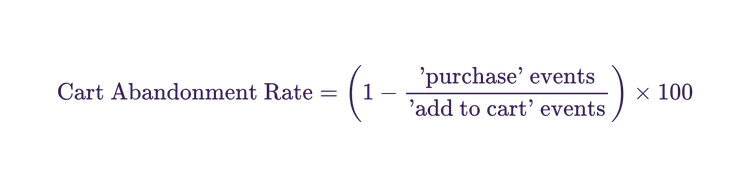
For example: 200 sessions reach your Stager checkout; 60 complete a purchase. Abandonment rate = (1 − 60/200) × 100 = 70%.
The global average for e-commerce cart abandonment sits at around 70%. Importantly, roughly 43% of abandonment is typical browsing behaviour, but the remaining 57% represents preventable cart abandonment. So, while you cannot get rid of cart abandonment entirely, there are opportunities to minimize friction and optimise your ticket sales conversion.
Friction Point 1: Too Many Steps
A long and complicated checkout process is your number one conversion killer. This is user interface friction, which slows down the time it takes to buy a ticket, from the intention to the purchase. Approximately 22% of shoppers abandon their purchases due to long and complicated checkout processes.
For your live events, this means you want to make sure that the time and effort it takes to purchase a ticket is low. This is especially true for mobile checkout, where most people purchase tickets, and where cart abandonment is 10% more likely compared to desktop devices.
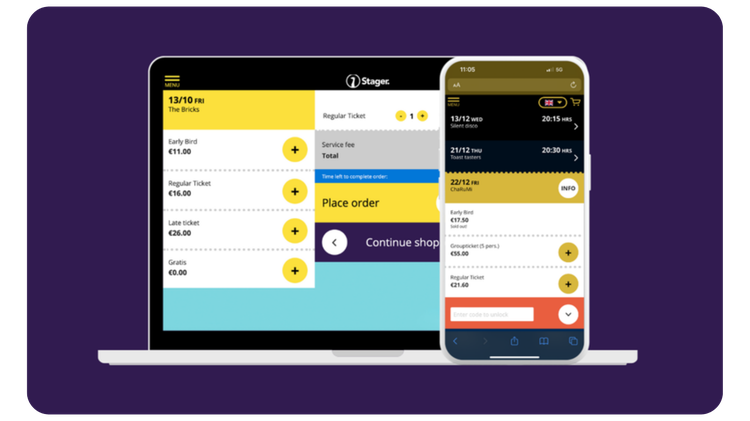
For example, Stager’s ticket shop is designed for flow and fast conversion. Large UI features, clear buttons, and navigating through one single page all contribute to speed, especially on mobile devices.
By integrating your ticket shop, like Stager’s, into your website through a widget, you can make the ticket-buying experience even more seamless. This way, your ticket-buyers don’t even leave your website when purchasing tickets, staying on the same domain. This reduces cognitive load drastically, for a seamless single-page checkout flow.
The Data vs. Friction Tradeoff
Of course, you want to collect solid data about your ticket-buyers at check-out. But that means more steps, more friction and more cart abandonment. This doesn’t mean you should get rid of data collection fields entirely.
Ticket-buyers expect that they will need to fill out some information to make their purchases. With data fields, you also build commitment, so that a ticket-buyer is more likely to feel they must finish what they started.
In principle, only ask for the information you need at checkout. It’s important to try and find the balance between what data will add value to your marketing, and what will not add value.
For reference, in Stager we give you the option to collect 12 different pieces of data, including gender, phone number, date of birth, organization, job title and more. However, it’s up to you to decide what is valuable for your event organization.
Friction point 2: Unexpected fees
Pricing friction is one of the single largest drivers of cart abandonment.
Your users have expectations of you as a ticket seller, and if they encounter something in the pricing that they don’t expect, they’re highly likely to abandon their cart.
For ticket-sellers, this most often occurs when adding service or booking fees on top of their original ticket price.
How can you use transparency as a ticket conversion strategy?
Show the full ticket price, including service fees, on the event page and not just at the payment step. This is called all-in pricing, and is vital for building transparency. A ticket buyer mentally commits to the price they see when browsing your website, and unexpected fees on top of that create friction.
Transparency can therefore be a conversion strategy. Clear service fees integrated into the ticket price means no surprises, and you meet the expectations of your ticket buyers.
In Stager, you can set your service fees, and they are integrated into your ticket price on your ticket shop. So when it’s time to pay, there’s no surprises, and less cart abandonment.
Friction point 3: Trust gaps
Trust in your brand is a driver of conversion. For an experiential good like an event, your ticket buyer is paying a high price for something that does not exist yet as a physical product. Your reputation and brand trust is vital to grounding them in a feeling of certainty that the event will go ahead and meet their expectations.
The need for trust is compounded by the ticket-buying process, which often leads ticket buyers through your website, to a separate ticket shop. Different fonts, different colours, a generic URL - these are all moments of visual disconnect, where your ticket buyers may feel confusion, or hesitation, and abandon their carts.
How to build trust through a fully branded ticket shop
A ticket shop and check out experience that carries your visual identity, such as your logo, brand colors, event photography and more, signals continuity. The brand trust that you’ve grown carries over through to the ticket-purchasing moment, and the seamless brand experience mitigates emotional friction.
Ensure that your ticket shop is fully branded to your organization’s visual identity. This means the ticket shop should have:
- Your logo visible
- Your brand colors
- Imagery, like photos from your event, or branded designs
- Your brand font
Friction 4: Just not ready yet
It can also be the case that your ticket buyer is just not ready yet to commit to a purchase. This can stem from many factors - maybe they don’t have enough cash, they need to wait to check their schedule, or they just aren’t feeling in a ‘buying’ mood.
This is the hardest friction to optimise for in your web flow. Instead, the most effective way to manage this is by utilising remarketing tactics.
Remarketing involves targeting people who’ve browsed your website or ticket shop with specific advertising. For example, if someone visited your website and clicked on an event for an upcoming Death Grips concert, but did not purchase a ticket, with remarketing you can show advertisements for the Death Grips concert on Instagram, Facebook, TikTok and more.
These advertisements have a high Return on Ad Spend (ROAS), as they’re directed towards your highest-intent audience. Directing them back to your website or ticket shop will give them another chance to finish what they started, at a time that better suits them.
Good to keep in mind: some event organisers hesitate to do remarketing because it feels pushy. But someone who got as far as your checkout page is a very warm prospective ticket buyer who got interrupted. A well-timed reminder is a service, not spam.
Summary
You don’t need to focus all your energy and budget on marketing to reach more people. Often, the problem isn’t attracting people, it’s losing them at the final step.
To reduce your cart abandonment, you need to identify your points of friction that are putting up roadblocks for your ticket buyers. For event organizers, common friction points include:
1. Too many steps in your ticket-buying process, including too many fields for information and an unintuitive, mobile-unfriendly UI. Solve this by using a smooth, mobile friendly ticket shop, and only collecting the information you need at checkout.
2. Unexpected fees, especially service fees, that arise during checkout. Solve this by showing your final ticket price, integrating the service fee, from the very start of the ticket-buying process.
3. A loss in trust from an unfamiliar ticket shop environment. Ensure your ticket shop is fully consistent with your organization’s branding so that the ticket-buying process is one, smooth experience with your brand.
4. Ticket-buyers just not ready yet to buy. Solve this by investing in remarketing campaigns, so that you can reach out to these potential ticket-buyers when they’re more ready to buy.
And don’t forget, small changes compound. Fixing one friction point in isolation can help with cart abandonment, but working through all four friction points together will have a synergistic impact on each other, optimising your entire ticket-buying journey.
Frequently Asked Questions
Cart abandonment in event ticketing happens when a potential attendee visits a ticket shop, selects one or more tickets, but leaves before completing payment. The global average abandonment rate across e-commerce is around 70%, meaning most people who start the buying process don't finish it.
Divide the number of completed purchases by the number of checkout sessions initiated (or "add to cart" events), subtract this number from 1, and multiply by 100. For example, if 200 people add tickets to their cart and 60 complete a purchase, your abandonment rate is (1 − 60/200) × 100 = 70%. Tools like Google Analytics 4 can track this automatically when your ticket shop is connected via Google Tag Manager.
The four most common reasons ticket buyers abandon checkout are: a long or complicated checkout process, unexpected fees appearing at the payment step, a lack of trust in the checkout environment (particularly when it looks different from the main website), and simply not being ready to commit at that moment.
The most effective way to reduce cart abandonment without additional marketing spend is to fix the friction points inside the checkout flow itself. This includes reducing the number of form fields, showing all-in pricing from the start and ensuring the ticket shop is visually consistent with your brand. These are one-time improvements that compound over every future sale, unlike ad spend, which stops working the moment you stop paying.
Author
Written by Tom Harden
Marketing and Communications Coordinator