How to Use Email Marketing to Boost Engagement with Your Audience
31 August 2026 - Senna Huurman - Reading time: 4 mins
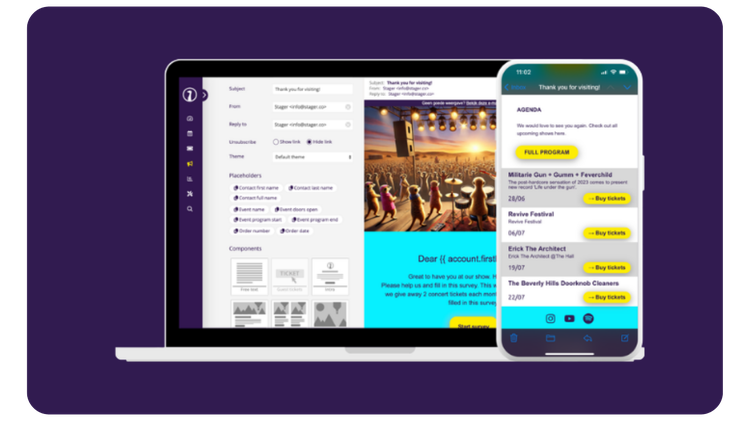
Almost every channel you use to reach your audience, causes the rope of control to slip out of your hands. When you post about your event on Instagram, you're guessing what share of your followers will actually see it. However, when you send an email, it lands directly in the inbox of your audience (something they actually check).
With email marketing you own the list, you decide who sees what, and you're not paying a platform to reach people who already chose to hear from you. Using it to boost your engagement comes down to three things: who you're emailing, when, and what happens after they act.
1: Send fewer, better-targeted emails
A single mailing to your entire list treats a first-timer the same as someone who's been to ten of your shows. Try splitting contacts into groups, by past attendance, ticket type, or the kind of events they've shown interest in, because this will cause each email to actually match what the person on the other end cares about.
Two improvements that pay off instantly:
The subject lines
Personalized subject lines gain roughly 50% higher open rates than generic ones. That's not a small edge, and it costs nothing beyond setting up the segments in the first place.
Calls to action
Personalized call to actions are 202% more effective than generic, one-size-fits-all buttons. If your "Buy tickets now" button says the same thing to everyone, you're missing out on a significant amount of engagement.

2: Reminders people actually act on
A reminder that simply says "don't forget!" doesn't do much. A reminder that does, is one that removes friction, mentions door times, offers directions, and informs what to bring. Reminders with concrete, practical information reduce no-shows more than a generic nudge, because they answer the questions your customers will have on the day.
But, there are a couple of more things worth adding to your upcoming marketing emails. Put in an "add to calendar" link so the event plants itself in someone's real schedule, show a preview of what's coming (a support act, a setlist hint, a Spotify playlist to get people in the mood), or introduce an early-access extra for people who show up on time. It’s not rocket science, but it's the difference between an email that gets read and one that gets skimmed and forgotten.
If you run events on a regular schedule, you’ll be able to save real hours by setting this up once so it runs automatically for every future event, rather than writing a new reminder from scratch each time.

3: The after-math is just as important
Most organizers stop emailing the moment the event ends. This is a missed opportunity as you’ll keep the relationship with your customer from growing, and overlook opportunities to learn something from them.
For example, you can gather information from them through post-event surveys. In those questionnaires, customers that are asked an open-ended, positive question first ("what went well?") kept coming back more frequently over the following year than those asked only standard rating questions, especially more often than those who weren't surveyed at all. Keep in mind that the order and framing matters, don’t overly rely on the “asking” part.
Pair this with a simple thank-you and a reason to come back (like a discount on the next show, or early access to the next on-sale) and you've turned a one-time attendee into someone who's more likely to buy again! As with reminders, this is also worth automating when you're running events often enough that writing a fresh follow-up every time threatens to become its own job.

A system that offers it all
All of the tips and tricks I’ve given you in this article will help you improve your customer engagement through email marketing. Now here comes the fun part (especially for me, the marketeer)!
Customer segmentation, reminders, and follow-ups all run through the same system in Stager, which means that you don’t need to rebuild all of it from scratch each time. It's a solution that saves you time and boosts your performance through:
The Audience Builder that lets you group contacts by attendance history, ticket type, or interest, so targeting isn't a manual export-and-filter job
The drag & drop mailer that handles the actual sending, with placeholders for personalized names and details pulled straight from your event data
Automation that lets you set up reminder and follow-up sequences once, so they run for every future event without extra work
The built-in CRM that keeps every contact's history in one profile, so segmentation and personalization use real data instead of guesswork
Has Stager caught your attention? You can further explore all of Stager's marketing features by clicking here.
Frequently Asked Questions
Social platforms decide who sees your posts through their algorithm, so reach isn't guaranteed. Email lands directly in an inbox your audience already checks, and you own the list, meaning you control who sees what without paying a platform to reach people who already chose to hear from you.
Yes. A study by Yes Lifecycle Marketing, analyzing over 7 billion emails, found personalized subject lines saw roughly 50% higher open rates than generic ones. It costs nothing beyond setting up audience segments in the first place.
More than "don't forget." Effective reminders include practical details like door times, directions, and what to bring, plus an add-to-calendar link. Concrete, practical information reduces no-shows more reliably than a generic nudge, because it answers the questions attendees actually have on the day.
Yes, most organizers stop too early. A Baylor University field study found customers asked an open-ended, positive question first ("what went well?") in a post-event survey spent meaningfully more over the following year than those asked only standard rating questions. Pair a survey with a thank-you and a reason to return.
Yes. Once reminder and follow-up templates are set up per event type, they can run automatically for every future event, using placeholders to personalize by recipient. This saves real time for organizers running events on a regular schedule.
Author
Written by Senna Huurman
Marketing and Sales Intern